

Libros Dañados
Cobra a las cuentas de estudiantes o del personal los libros perdidos, dañados o inutilizables, todo desde la pantalla de devolución.
Cuando los libros se devuelven en mal estado o no se devuelven del todo, Mosaic te permite registrar lo ocurrido y cobrarlo a la cuenta del prestatario en un solo paso durante la devolución.
Condición del libro
Sección titulada «Condición del libro»Cada artículo de la biblioteca tiene una condición que puede actualizarse cada vez que cambia de manos. Las condiciones van de la mejor a la peor:
| Condición | Etiqueta |
|---|---|
| N | Nuevo |
| L | Como nuevo |
| V | Muy bueno |
| G | Bueno |
| F | Regular |
| P | Malo |
| U | Inutilizable |
Puedes definir la condición tanto al prestar como al regresar. Darle seguimiento a lo largo del tiempo ayuda a identificar los libros que necesitan reparación o reemplazo antes de que queden inservibles.
Cobrar por daños o pérdida
Sección titulada «Cobrar por daños o pérdida»Los cargos se aplican durante la devolución. Al regresar una colección, haz clic en el botón Cobrar daños y artículos faltantes para mostrar las columnas de cargo en la cuadrícula de devolución.
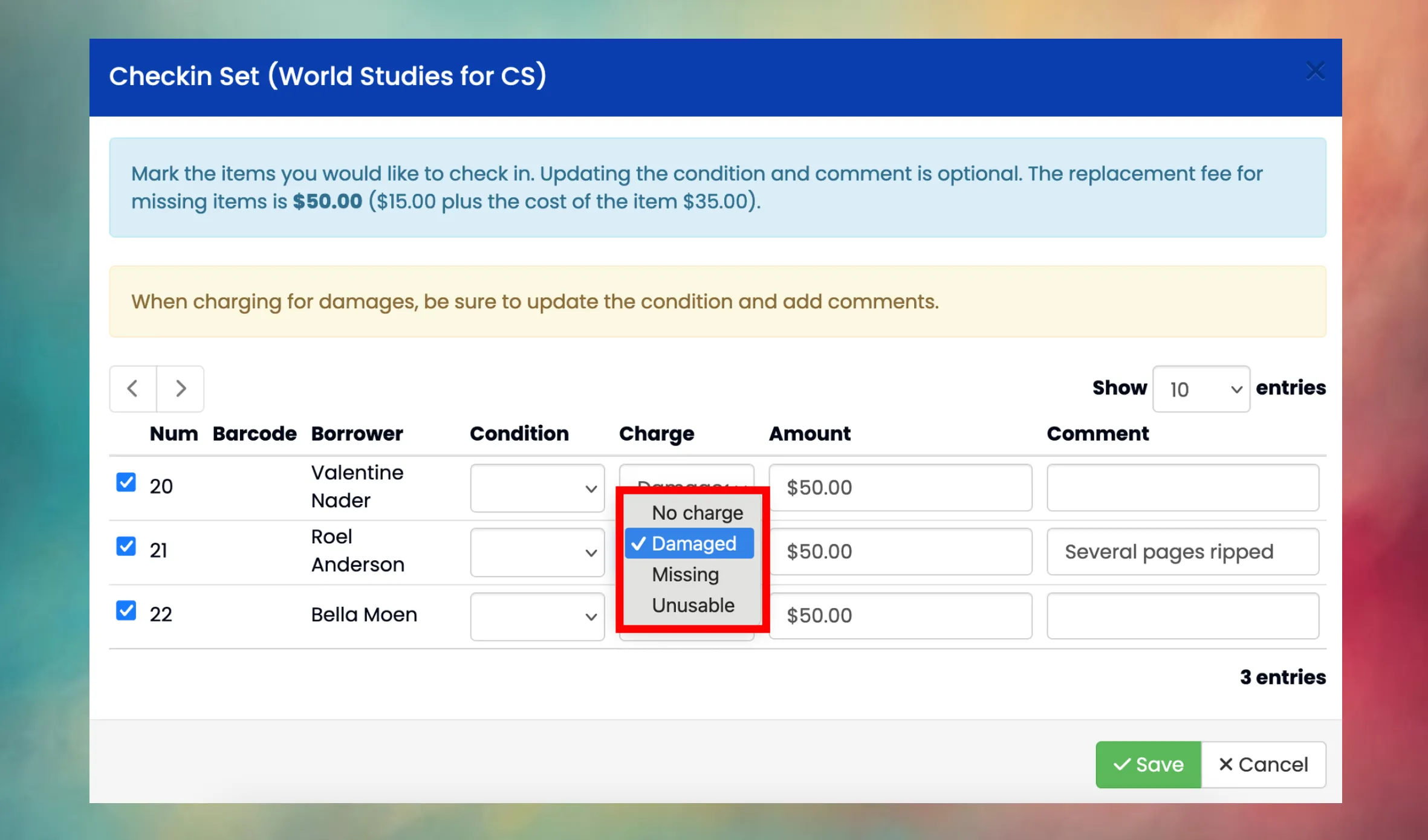
Para cada artículo puedes seleccionar un tipo de cargo:
| Tipo de cargo | Cuándo usarlo | Qué sucede |
|---|---|---|
| Sin cargo | El libro se devolvió en condición aceptable. | El artículo vuelve al estante con normalidad. |
| Dañado | El libro se devolvió, pero en peor condición de la esperada. | El artículo vuelve al estante. Debes ingresar un monto personalizado, actualizar la condición y agregar un comentario que describa el daño. |
| Faltante | El libro no se devolvió. | El artículo se marca como Perdido. El monto del cargo toma por defecto la tarifa de reemplazo. No hace falta indicar condición, ya que el libro no está a la vista. |
| Inutilizable | El libro se devolvió, pero demasiado dañado para volver a circular. | El artículo se marca como Inactivo (fuera de circulación). El monto del cargo toma por defecto la tarifa de reemplazo. El comentario es obligatorio. |
Requisitos según el tipo de cargo
Sección titulada «Requisitos según el tipo de cargo»- Dañado: la condición, el monto y el comentario son todos obligatorios. El monto lo defines tú según la gravedad del daño.
- Faltante: solo el monto es obligatorio (toma por defecto la tarifa de reemplazo). La condición se borra automáticamente.
- Inutilizable: el monto y el comentario son obligatorios. La condición se fija automáticamente en Inutilizable.
Tarifas de reemplazo
Sección titulada «Tarifas de reemplazo»El monto predeterminado para los artículos faltantes e inutilizables se calcula a partir de la tarifa de reemplazo configurada a nivel de biblioteca o de categoría, del costo del artículo registrado en la colección, o de ambos. Cómo se combinan depende del modo de tarifa de la biblioteca:
| Modo de tarifa | Cargo predeterminado |
|---|---|
| Costo del artículo + tarifa | Tarifa de reemplazo + costo del artículo |
| Costo del artículo | Costo del artículo |
| Tarifa de reemplazo solamente | Tarifa de reemplazo |
Mosaic busca primero una tarifa a nivel de categoría, luego recurre a la tarifa de la biblioteca y, por último, al valor predeterminado del distrito. El diálogo de devolución muestra la tarifa calculada en la parte superior para que sepas cuánto se va a cobrar.
Requisito de cuenta
Sección titulada «Requisito de cuenta»Los cargos se registran en la cuenta de cliente del prestatario en contabilidad. Si el prestatario no tiene una cuenta configurada, la fila aparecerá en rojo y el cargo no podrá crearse. Primero tendrás que crearle una cuenta a esa persona en el módulo de Caja.
- En el caso de los estudiantes, los cargos van a la cuenta de su familia.
- En el caso de los empleados, los cargos van a su cuenta de empleado.
Notificaciones
Sección titulada «Notificaciones»Cuando se crea un cargo, Mosaic envía automáticamente una notificación por correo al prestatario (o a sus padres o tutores, si el prestatario es un estudiante). Se usan plantillas de carta modelo distintas según el tipo de cargo:
- Los artículos faltantes usan la plantilla LibraryChargeMissing.
- Los artículos dañados o inutilizables usan la plantilla LibraryChargeDamaged.
También se envían notificaciones cuando un cargo se modifica o se elimina.
Administrar los cargos
Sección titulada «Administrar los cargos»Una vez creado un cargo, puedes modificarlo o eliminarlo desde el historial de préstamos, siempre que todavía no se le haya aplicado ningún pago.
- Modificar: cambiar el monto o la descripción del cargo.
- Eliminar: borrar el cargo por completo (se elimina el registro financiero).
Cuando ya se aplicó un pago a un cargo, este queda bloqueado y no se puede modificar ni eliminar.
Preguntas frecuentes
Sección titulada «Preguntas frecuentes»¿Puedo cobrar por un libro sin regresarlo?
No. Los cargos son parte del proceso de devolución. Para cobrar por un libro faltante, regresa la colección y selecciona Faltante como tipo de cargo para ese artículo. El libro quedará marcado como perdido en lugar de volver al estante.
¿Y si elegí el tipo de cargo o el monto equivocado?
Puedes modificar o eliminar el cargo después, siempre que todavía no se le haya aplicado un pago. Ve al historial de préstamos de ese artículo para encontrarlo.
¿Cuál es la diferencia entre Faltante e Inutilizable?
Faltante significa que el libro nunca se devolvió: no está localizado. El artículo permanece en el sistema con el estado Perdido, por si aparece más adelante (por ejemplo, durante un escaneo de inventario).
Inutilizable significa que el libro se devolvió pero está demasiado dañado para usarse. El artículo se marca como Inactivo y sale de circulación de forma permanente.
Ambos cobran por defecto la tarifa de reemplazo completa.
Apareció un libro que estaba marcado como faltante. ¿Qué hago?
Si un libro marcado como perdido aparece en el estante, puedes escanearlo durante un inventario de la biblioteca: Mosaic cambiará automáticamente su estado de vuelta a Estante. También puedes actualizar el estado del artículo manualmente. Si se había creado un cargo, tal vez quieras eliminarlo (si no está pagado) o tramitar un reembolso desde el módulo de Caja.