

Damaged Books
Charge student or staff accounts for lost, damaged, or unusable books — all from the checkin screen.
When books are returned in poor condition or not returned at all, Mosaic lets you record what happened and charge the borrower’s account in a single step during checkin.
Book Condition
Section titled “Book Condition”Every library item has a condition that can be updated whenever it changes hands. Conditions range from best to worst:
| Condition | Label |
|---|---|
| N | New |
| L | Like New |
| V | Very Good |
| G | Good |
| F | Fair |
| P | Poor |
| U | Unusable |
You can set the condition during both checkout and checkin. Tracking condition over time helps identify books that need repair or replacement before they become unusable.
Charging for Damage or Loss
Section titled “Charging for Damage or Loss”Charges are applied during checkin. When checking in a set, click the Charge damages and missing items button to reveal the charge columns in the checkin grid.
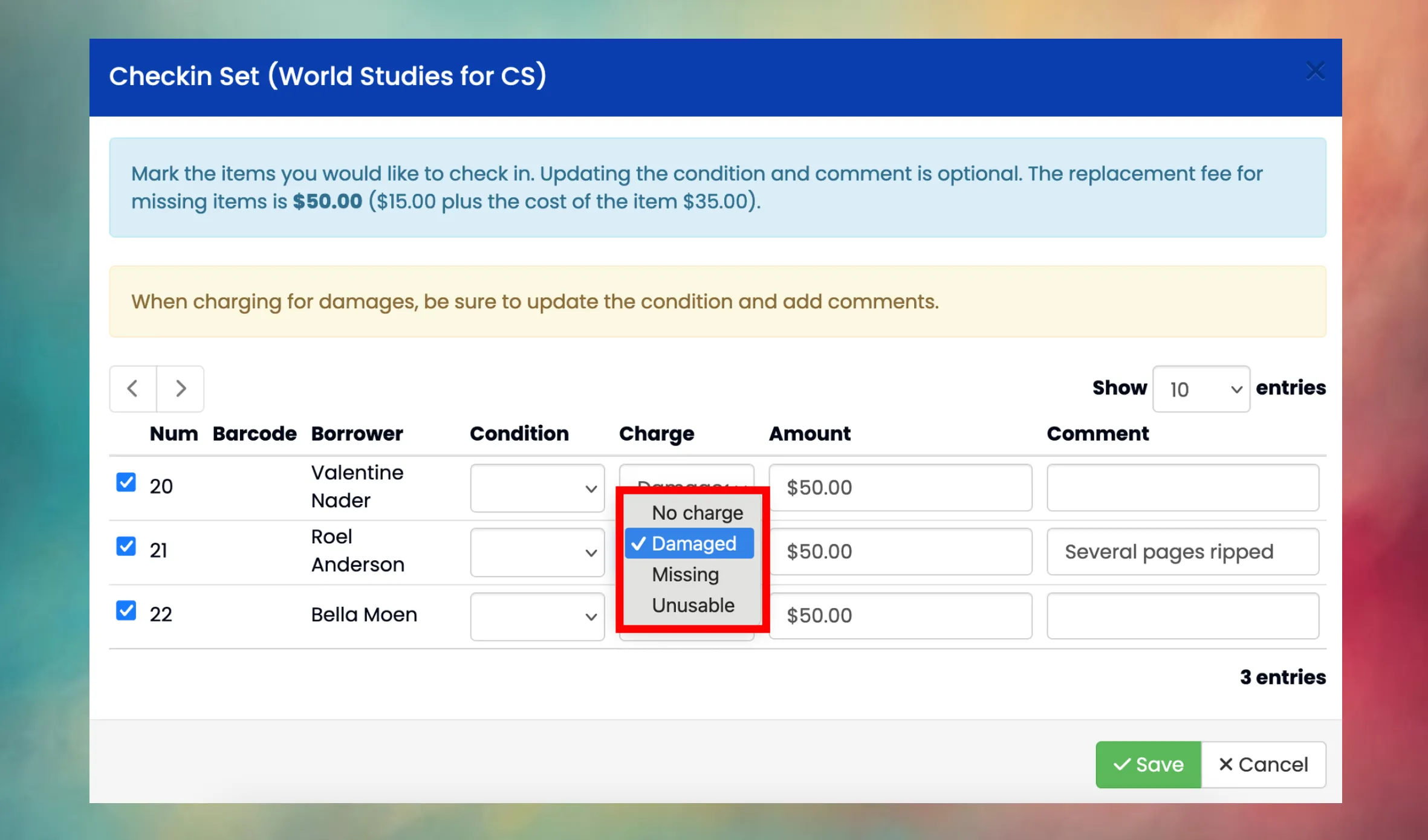
For each item, you can select a charge type:
| Charge Type | When to Use | What Happens |
|---|---|---|
| No charge | Book returned in acceptable condition. | Item returns to the shelf normally. |
| Damaged | Book returned but in worse condition than expected. | Item returns to the shelf. You must enter a custom charge amount, update the condition, and add a comment describing the damage. |
| Missing | Book was not returned. | Item is marked as Missing. The charge amount defaults to the replacement fee. No condition is needed since the book isn't in hand. |
| Unusable | Book returned but too damaged to circulate again. | Item is marked as Inactive (removed from circulation). The charge amount defaults to the replacement fee. A comment is required. |
Requirements by Charge Type
Section titled “Requirements by Charge Type”- Damaged: condition, amount, and comment are all required. You set the amount yourself based on the severity of the damage.
- Missing: only amount is required (defaults to the replacement fee). Condition is cleared automatically.
- Unusable: amount and comment are required. Condition is automatically set to Unusable.
Replacement Fees
Section titled “Replacement Fees”The default charge amount for Missing and Unusable items is calculated from the replacement fee configured at the library or category level, and/or the item cost on the set record. How these combine depends on the library’s fee mode:
| Fee Mode | Default Charge |
|---|---|
| Both | Replacement fee + item cost |
| Item only | Item cost |
| Fee only | Replacement fee |
Mosaic checks for a fee at the category level first, then falls back to the library-level fee, and finally the district-wide default. The checkin dialog shows the calculated fee at the top so you know what will be charged.
Account Requirement
Section titled “Account Requirement”Charges are posted to the borrower’s accounting client account. If a borrower doesn’t have an account set up, the row will appear in red and the charge cannot be created. You’ll need to set up an account for that person in the Cashier module first.
- For students, charges go to their family account.
- For employees, charges go to their employee account.
Notifications
Section titled “Notifications”When a charge is created, Mosaic automatically sends an email notification to the borrower (or their parents/guardians if the borrower is a student). Different form letter templates are used depending on the charge type:
- Missing items use the LibraryChargeMissing template.
- Damaged or Unusable items use the LibraryChargeDamaged template.
Notifications are also sent when a charge is modified or removed.
Managing Charges
Section titled “Managing Charges”After a charge is created, you can modify or remove it from the checkout history — as long as no payments have been applied to it yet.
- Modify: change the charge amount or description.
- Remove: delete the charge entirely (the financial record is removed).
Once a payment has been applied against a charge, it becomes locked and can no longer be modified or deleted.
Can I charge for a book without checking it in?
No. Charges are part of the checkin process. To charge for a missing book, check in the set and select Missing as the charge type for that item. The book will be marked as Missing rather than returned to the shelf.
What if I set the wrong charge type or amount?
You can modify or remove the charge afterward, as long as no payment has been applied yet. Go to the checkout history for that item to find the charge.
What's the difference between Missing and Unusable?
Missing means the book was never returned — it’s unaccounted for. The item stays in the system with a Missing status in case it turns up later (e.g., during an inventory scan).
Unusable means the book was returned but is too damaged to use. The item is marked Inactive and removed from circulation permanently.
Both charge the full replacement fee by default.
A missing book was found. How do I handle it?
If a book marked as Missing is found on the shelf, you can scan it during a library inventory — Mosaic will automatically change its status back to Shelf. You can also manually update the item’s status. If a charge was created, you may want to remove it (if unpaid) or process a refund through the Cashier module.