

Calendar
Esta página aún no está disponible en tu idioma.
Bring all schedules together in one convenient location.
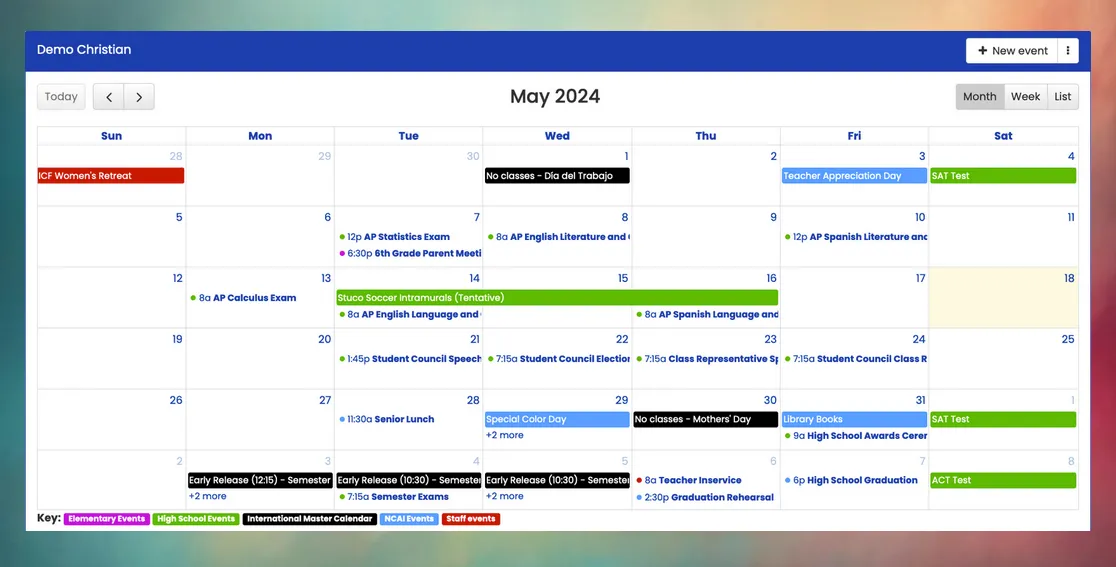
The Calendar feature simplifies tracking upcoming school events, ensuring that everyone remains informed and organized. Mosaic’s calendar is designed for collaboration and integration, accommodating a wide range of important dates and events, from exams and holidays to extracurricular activities and parent-teacher meetings. With intuitive navigation and customizable options, administrators, teachers, students, and parents can efficiently plan and engage in school events.
Collaboration
Section titled “Collaboration”You can create multiple calendars, including a school master calendar, elementary events, high school events, sports, extracurricular activities, and staff events. Authorized personnel can update events on each calendar according to their access permissions. Parents and students will only have visibility into the calendars designated for their access.
Mosaic automatically sends weekly email reminders of upcoming events to everyone in your community.
Integration
Section titled “Integration”Mosaic’s calendar seamlessly integrates with Google Calendar and other digital calendar platforms, allowing everyone in your community to view school events within their personal calendars. Additionally, users have the option to automatically incorporate student and staff birthdays into their digital calendars.
Master Calendar
Section titled “Master Calendar”Events on the school’s master calendar are integrated into other Mosaic features. Including holidays and teacher in-service days ensures that Mosaic does not prompt teachers for attendance and lunch orders on those dates. Additionally, master calendar events are integrated into teacher PlanBooks, facilitating more efficient unit and lesson planning.
| Event Category | Description |
|---|---|
| No school (holiday) | Do not prompt teachers for attendance and lunch orders. |
| No school (teacher planning) | Do not prompt teachers for attendance and lunch orders. Teachers are still expected to attend. |
| No school (other) | Do not prompt teachers for attendance and lunch orders. Examples could include snow days and other calendar changes not related to a holiday. |
| Early release | Specify a different start and/or end time of the day, which also adjusts the calculation of partial absences for late arrivals or students who sign in or out during the day. |
| School activity | This category is typically used when students are present at school for special programs or activities but do not attend regular classes. PlanBooks automatically avoid scheduling normal lesson plans on these days. |
Details
Section titled “Details”Some of the key information that your calendar will store about events are:
- Start and End Times
- Contact Person
- Event Description (in multiple languages)
- Event Location (in multiple languages)
- Announce Days: How long in advance should the event appear on the home screen and in weekly emails?
How do you manage visibility for specific calendars?
In the settings of each calendar, you can set the calendar visibility as public or limited. For limited visibility, you can narrow visibility to specific staff categories, as well as parents and/or students of selected grade levels. You can also specify which staff users are allowed to create and modify events on the calendar. When authorized users create events, they will choose which calendar the new event is added to.
How do I change the time of an event after I've already created it?
After creating an event, you can easily update its time. Administrators can make changes by double-clicking on the event in the calendar, and the new time will automatically update for anyone who has it on their calendar. You can also drag the event to a new date or time.
Do I need to create all new events each school year?
Instead of creating all new events each year, you should use the calendar rollover feature. This functionality gives you a list of all events from the previous year and allows you to drag them onto the calendar for the new year. This will create a copy of the past event, which you can later edit or update if needed. You can also duplicate past events one at a time.